| Setting | Description |
|---|---|
| Adjust Background for… | You must select between applying the Background Adjustment to ALL COMPONENTS or to apply the adjustment ONLY to components marked as NDE or CVS (this means that each component is marked as YES in the NDE or CVS property field). |
| Automatically close leaks with a first repair attempt and passing inspection | Select this option if you want the leak to close automatically once a repair attempt has been logged after a failed inspection, followed by a passing inspection. This process only runs when an inspection is added, not during repair attempts.
This function works with all three inspection types: AVO, M21, and OGI. If a leak is triggered by a specific inspection type, it must be closed with a repair attempt followed by either a retest of the same type or an M21 ReTest. |
| Chateau Mobile Non-Tour Tags Database Generation Policy |
The option to select whether you want the tags in the Area / LUnit which are NOT in the tour to be checked out into Chateau Mobile so the tech can research components found outside their tour. If a Non-Tour tag is assigned to another technician’s tour, monitoring the tag will remove it from that technician’s tour after check-in, as long as the monitoring fulfills the scheduled inspection requirements. |
| Credit passing inspections during DOR toward MMQ phase | When enabled, the two passing monthly inspections performed while a component is on DOR count as m1 and m2, so the component advances directly to the mmQ (Quarterly) phase when it comes off DOR. When disabled, a component coming off DOR always starts back at the first month of the MMQ cycle. This setting is off by default. |
| Enable Background Adjustment to Gross PPM | Enable this setting if you want to subtract the current Background PPM from the Gross PPM Reading before deciding whether a component is leaking. If you want to make this Background adjustment, then use the next feature to specify what sort of components you want to do the adjustment on. Note: Chateau has built-in protections against negative Final PPMs. During an M21 inspection, if the lowest PPM of the inspection drops below the currently saved background PPM, Chateau Mobile will automatically adjust the background to the lower PPM. When entering M21 inspections manually in Chateau, you will not be able to save the inspection if your Final PPM is below 0. |
| Enable Simple Maintenance | For prompting techs to perform Simple Maintenance when finding a leak. You may also want to go to Field Events and enable the Simple Maintenance Safety Checklist. |
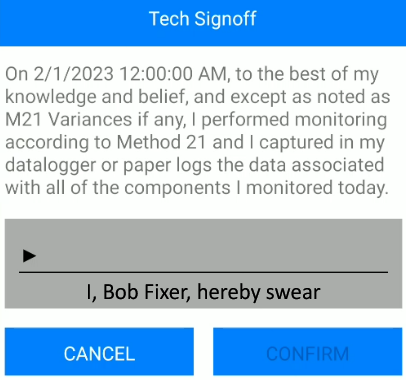
| Enable Technician Sign Off |
A feature for having techs sign off each day Method 21 is fully complied with before syncing up any inspection results. |
| M21 FailSafe | M21 FailSafe is for Cal5.0 only. If you are not using CAL5.0, please leave this option off. It will only allow the tech to use the analyzer for monitoring if the analyzer has been calibrated by Cal5.0 and has a passing confirmation. Note: This only confirms there is a successful daily calibration. It does not confirm there is a successful calibration on all Leak Definitions. |
| Prompt ReTest with Attempt | This will prompt a ReTest after entering an Attempt in Chateau Mobile. This is designed to ensure a ReTest is performed, however, the tech still has the option to cancel the ReTest without performing, if necessary. Note: Enable Simple Maintenance needs to be turned on for this to work. |
| Prompt technicians for work performed at check-in | When enabled, technicians are asked to record the type of work they performed each time they check in from the field. Customize the list of work types under Settings > Picklists > Inspections > Work Performed, and view results under Reports > Work Performed. This setting is off by default. |
| Sort Tours by LUnit then Tag (not Route Sequence) | Available for you to ignore the Route Sequence and sort the Tours by Tag number. This will be done on Tours checked out to Chateau Mobile as long as this option is enabled. |
Miscellaneous Settings

Comments
0 comments
Please sign in to leave a comment.